 BP OT


 Download client
 Server save 05:00
 Forum

BP OT · Kepler-186f
Explore Kepler-186f: an independent Brazilian Tibia 15.30 server with accelerated progression, five vocations, Rookgaard, hunts, quests and events to enjoy with friends.
A world to explore your way
- Five vocations: Knight, Paladin, Sorcerer, Druid and Monk, each with its own combat style and progression.
- Rookgaard for island exploration and legends; the mainland for hunts, quests, bosses and adventures with friends.
- Autoloot is available to everyone without VIP. Houses, guilds, the item Market and rankings are part of the experience.
- A website in Portuguese, English and Polish, with an assistant for questions about the server.
BP OT is an independent server and is not affiliated with CipSoft.
Character levels and progression rates
All new characters start at level 1 in Rookgaard without a vocation. At level 8 or 9, speak to The Oracle to choose a vocation and leave for the mainland. To buy an existing advanced character, visit the Bazaar.
| Progression | Range | Base rate |
|---|---|---|
| Experience | 1–8 | 100x |
| Experience | 9–50 | 120x |
| Experience | 51–100 | 80x |
| Experience | 101–150 | 60x |
| Experience | 151–200 | 50x |
| Experience | 201–300 | 30x |
| Experience | 301–400 | 24x |
| Experience | 401–500 | 20x |
| Experience | 501–600 | 14x |
| Experience | 601–700 | 12x |
| Experience | 701–800 | 10x |
| Experience | 801–900 | 8x |
| Experience | 901–1000 | 6x |
| Experience | 1001–1200 | 4x |
| Experience | 1201–1400 | 3x |
| Experience | 1401+ | 2,4x |
| Skills | 1–80 | 10x |
| Skills | 81–100 | 7x |
| Skills | 101–120 | 4x |
| Skills | 121+ | 2x |
| Magic level | 0–80 | 10x |
| Magic level | 81–100 | 7x |
| Magic level | 101–120 | 4x |
| Magic level | 121–130 | 3x |
| Magic level | 131+ | 2x |
| Loot | General | 10x |
These are the mainland base rates. Events, VIP and other game modifiers may affect your final gains. Loot 10x is a drop multiplier, not a guarantee that every item will drop. Rookgaard has its own rates. Green stamina for everyone: up to 5 hunting hours with +50% XP, between 42h and 37h of stamina. Total: 42h. Each bonus minute takes 6 offline minutes to recover, after the initial 10-minute wait; there is no automatic daily reset. With VIP +30%, these two XP bonuses combine for 1.95× before other modifiers. The client bar color may follow its original visual threshold; check the XP multiplier.
Discover Rookgaard →Events for your calendar
All times are Brasília time (UTC−3). In-game announcements appear 15 and 5 minutes before invasions. The boss identity is a surprise.
View the event calendar →Autoloot, healing and attacks: commands and hotkeys
BP OT includes its own hunting helpers. Type the commands in game chat or assign each one to a text hotkey. No extra program is required. The panel, automatic healing and attack are exclusive to Premium VIP; autoloot is for everyone.
Autoloot
| Command | Function |
|---|---|
!autoloot on | Enables automatic loot for regular creature kills. Available without VIP; bosses are excluded. |
!autoloot off | Disables autoloot. |
Automatic healing
| Command | Function |
|---|---|
!healer auto | Configures and enables automatic healing, selecting available spells and potions for your vocation and level. |
!healer | Shows whether healing is enabled, the health/mana thresholds and configured spells and potions. |
!healer alt | Toggles healing on or off. Useful as a hotkey. |
!healer off | Disables automatic healing. |
!healer magia 85 | After setting up auto mode, sets healing spells to trigger at 85% health or below. |
!healer vida 50 | In auto mode, sets health potions to trigger at 50% health or below. |
!healer mana 40 | In auto mode, sets mana potions to trigger at 40% mana or below. |
Attacking monsters
| Command | Function |
|---|---|
!atk on | Enables automatic attacks: finds the closest monster in the visible area when there is no valid target. |
!atk alt | Toggles automatic attacks on or off; suitable for a hotkey. |
!atk off | Disables automatic attacks and stops attacking the current target. |
!atk magia auto | Uses your vocation’s automatic attack spell selection. Use !atk magia off to disable spells only. |
!atk modo seguir | Follows the monster for close combat. Default mode for Knights and Monks. |
!atk modo longe | Attacks without chasing the monster. It does not automatically retreat or keep your distance. |
!atk runa sudden death rune | Sets a rune to use on the target. Requires runes in your backpack and normal usage requirements. Disable with !atk runa off. |
!atk | Shows attack status, mode, spell and rune. |
Healing and attacks on one key
!bot
The !bot command toggles healing and attacks together. If both are enabled, it disables both; otherwise, it enables both. It does not change autoloot. Check the in-game confirmation after pressing the hotkey.
Spells, potions and runes consume normal resources and obey level, vocation, range and cooldown requirements. Carry supplies and keep an eye on combat. These commands do not follow a hunting route, avoid hazards or replace your control of the character.
How to set hotkeys in the 15.30 client
Choose unused keys in your profile. These are examples: keep your emergency healing keys and check before replacing an important shortcut.
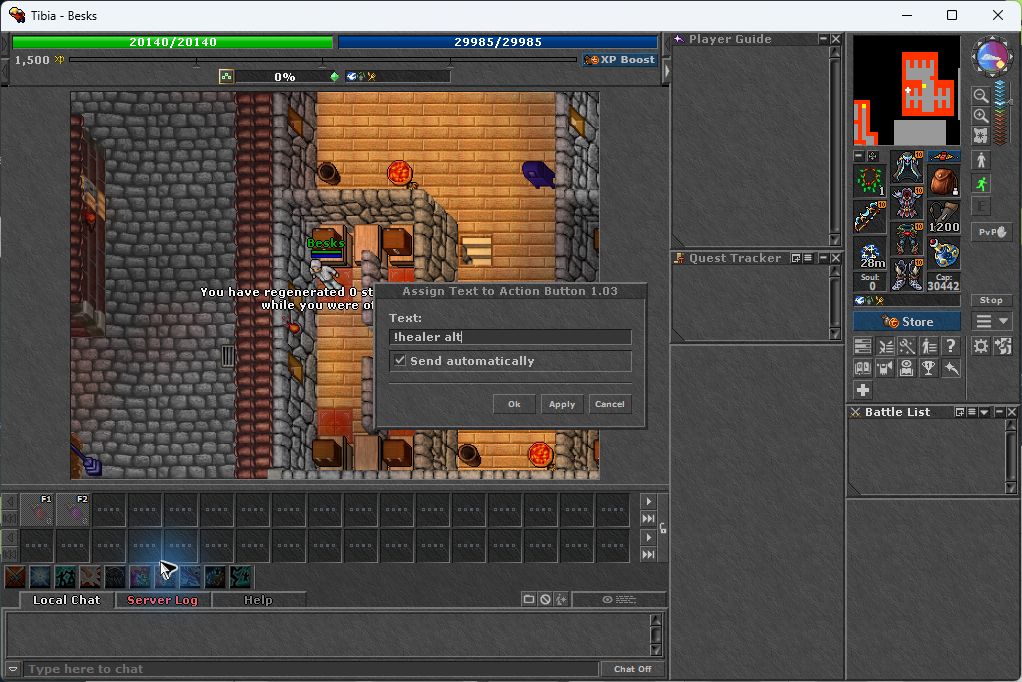
- In the 15.30 client, right-click an unused action bar slot and choose Assign Text.
- Enter the full command, such as !healer alt, select Send Automatically and confirm. This sends the text without requiring Enter.
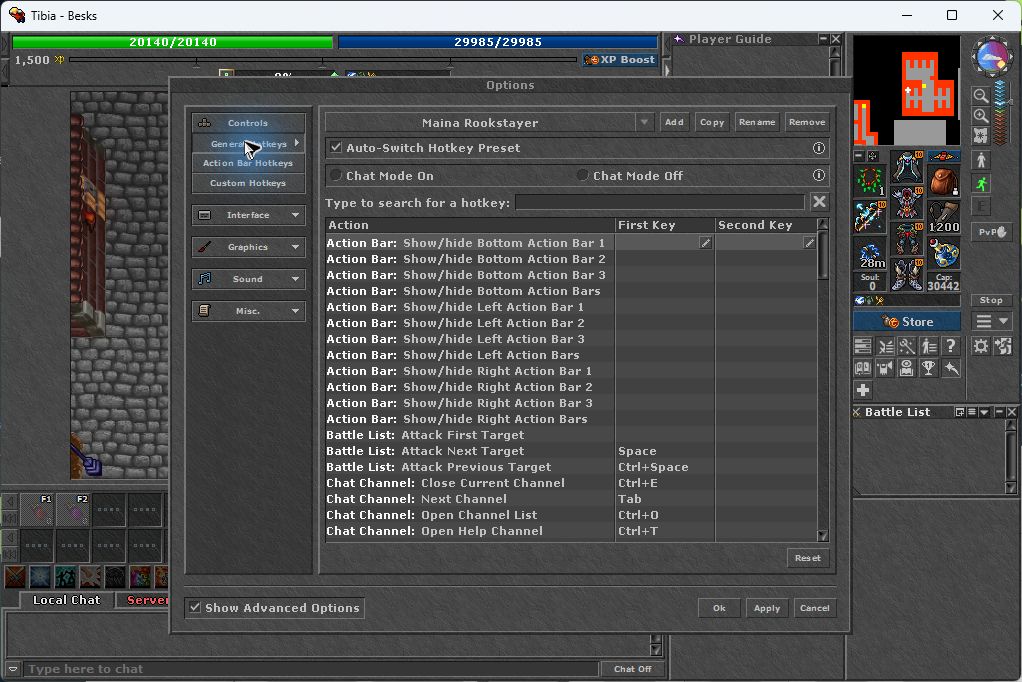
- Right-click the same button again and assign a hotkey. You can also review shortcuts in Options → Hotkeys → General Hotkeys (Ctrl+K), using the correct preset and Chat On/Chat Off mode.
- Test while standing in a safe place and check the server response. Use !healer auto once to start with your vocation’s defaults, then toggle with !healer alt.
| Suggested key | Command | Function |
|---|---|---|
| F8 | !bot | Toggle healing and attacks together |
| F9 | !healer alt | Toggle healing only |
| F10 | !atk alt | Toggle attacks only |
| F11 | !autoloot on | Enable autoloot |
| F12 | !autoloot off | Disable autoloot |
Step-by-step screenshots
Click a screenshot to enlarge it.
Premium VIP: more progress for your account
Spells, transport and other basic Premium features remain free. The Premium area of Rookgaard is exclusive to accounts with active Premium VIP. Optional VIP adds these benefits to every character on your account:
| Plan | Days | Price in BRL | Tibia Coins | Discount |
|---|---|---|---|---|
| Monthly | 30 | R$ 20.00 | 203 | 0% |
| Six months | 180 | R$ 108.00 | 1,091 | 10% |
| Annual | 365 | R$ 204.00 | 2,061 | 15% |
A one-time payment for the selected period, with no automatic renewal. Pay by PIX, card through Stripe or Coins. Time activates after payment confirmation; if you already have VIP, the days extend your current expiry date. Group loot bonuses follow the server’s sharing rules.
In-game VIP purchases with Coins are in the Store. The item Market uses gold.
View Premium VIP plansCoins: packages and payment methods
Buy Coins by PIX or card through Stripe and use your balance for Premium VIP and the Character Bazaar. Bonuses below are already included in each package total.
| Package | Base Coins | Bonus | Total Coins | Price in BRL |
|---|---|---|---|---|
| Starter | 100 | +0 | 100 | R$ 9.90 |
| Adventurer | 500 | +50 | 550 | R$ 39.90 |
| Hero | 1,000 | +200 | 1,200 | R$ 69.90 |
| Legendary | 3,000 | +800 | 3,800 | R$ 179.90 |
| Immortal | 7,000 | +2,500 | 9,500 | R$ 379.90 |
Character Bazaar: ready for new hunts
Choose a listed character and buy it for a fixed price in Coins. Once the purchase completes, the character and its items are transferred to your account.
| Level | Characters | Price per character |
|---|---|---|
| 1,500 | 5 | 15,000 Coins |
| 1,000 | 5 | 10,000 Coins |
Before buying, open the listing and check the vocation, skills, equipment, backpacks, outfits and mounts. Each listing shows exactly what comes with that character; availability can change as characters sell.
Explore the Character BazaarPrices and availability are read directly from the shops.