


About Bp Commands
Autoloot, healing and attacks: commands and hotkeys
BP OT includes its own hunting helpers. Type the commands in game chat or assign each one to a text hotkey. No extra program is required.
Autoloot
| Command | Function |
|---|---|
!autoloot on | Enables automatic loot for regular creature kills. Available without VIP; bosses are excluded. |
!autoloot off | Disables autoloot. |
Automatic healing
| Command | Function |
|---|---|
!healer auto | Configures and enables automatic healing, selecting available spells and potions for your vocation and level. |
!healer | Shows whether healing is enabled, the health/mana thresholds and configured spells and potions. |
!healer alt | Toggles healing on or off. Useful as a hotkey. |
!healer off | Disables automatic healing. |
!healer magia 85 | After setting up auto mode, sets healing spells to trigger at 85% health or below. |
!healer vida 50 | In auto mode, sets health potions to trigger at 50% health or below. |
!healer mana 40 | In auto mode, sets mana potions to trigger at 40% mana or below. |
Attacking monsters
| Command | Function |
|---|---|
!atk on | Enables automatic attacks: finds the closest monster in the visible area when there is no valid target. |
!atk alt | Toggles automatic attacks on or off; suitable for a hotkey. |
!atk off | Disables automatic attacks and stops attacking the current target. |
!atk magia auto | Uses your vocation’s automatic attack spell selection. Use !atk magia off to disable spells only. |
!atk modo seguir | Follows the monster for close combat. Default mode for Knights and Monks. |
!atk modo longe | Attacks without chasing the monster. It does not automatically retreat or keep your distance. |
!atk runa sudden death rune | Sets a rune to use on the target. Requires runes in your backpack and normal usage requirements. Disable with !atk runa off. |
!atk | Shows attack status, mode, spell and rune. |
Healing and attacks on one key
!bot
The !bot command toggles healing and attacks together. If both are enabled, it disables both; otherwise, it enables both. It does not change autoloot. Check the in-game confirmation after pressing the hotkey.
Spells, potions and runes consume normal resources and obey level, vocation, range and cooldown requirements. Carry supplies and keep an eye on combat. These commands do not follow a hunting route, avoid hazards or replace your control of the character.
How to set hotkeys in the 15.30 client
Choose unused keys in your profile. These are examples: keep your emergency healing keys and check before replacing an important shortcut.
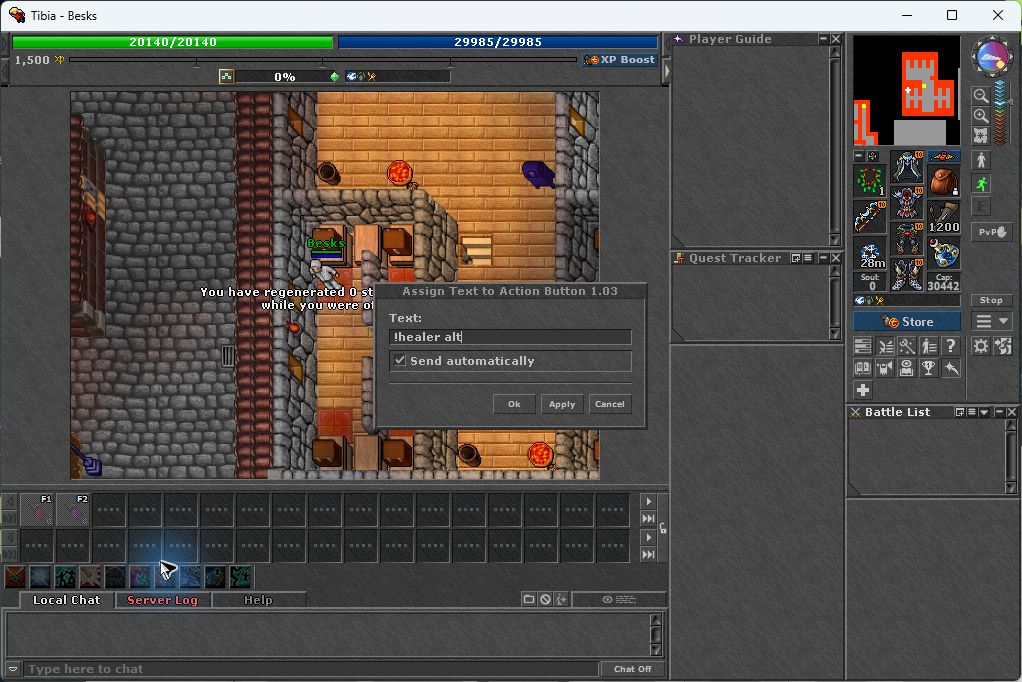
- In the 15.30 client, right-click an unused action bar slot and choose Assign Text.
- Enter the full command, such as !healer alt, select Send Automatically and confirm. This sends the text without requiring Enter.
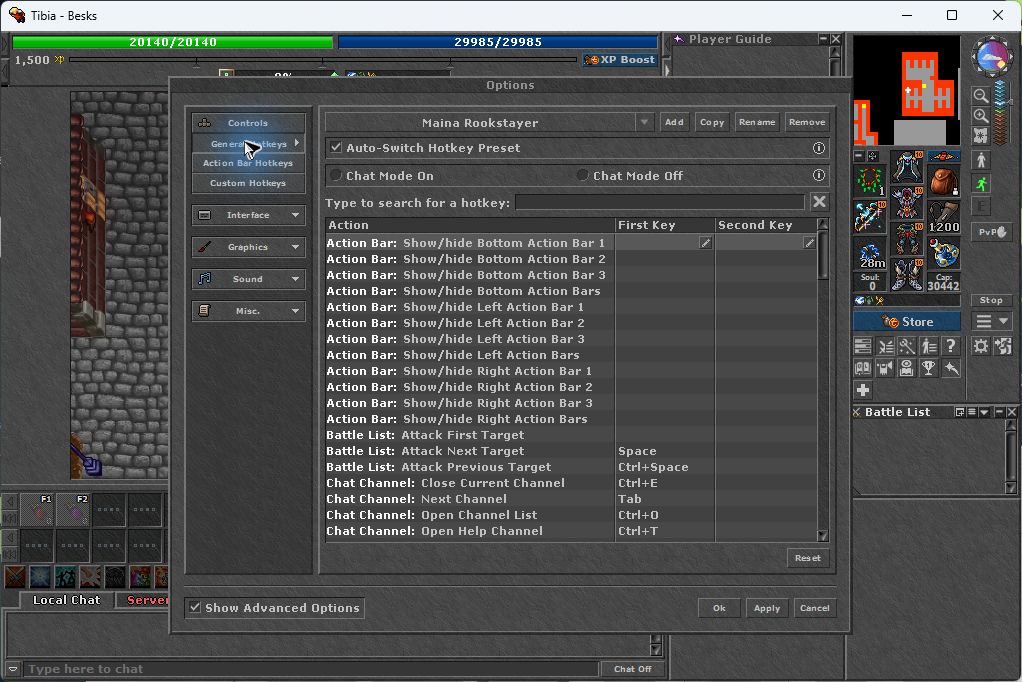
- Right-click the same button again and assign a hotkey. You can also review shortcuts in Options → Hotkeys → General Hotkeys (Ctrl+K), using the correct preset and Chat On/Chat Off mode.
- Test while standing in a safe place and check the server response. Use !healer auto once to start with your vocation’s defaults, then toggle with !healer alt.
| Suggested key | Command | Function |
|---|---|---|
| F8 | !bot | Toggle healing and attacks together |
| F9 | !healer alt | Toggle healing only |
| F10 | !atk alt | Toggle attacks only |
| F11 | !autoloot on | Enable autoloot |
| F12 | !autoloot off | Disable autoloot |
Step-by-step screenshots
Click a screenshot to enlarge it.


Players online